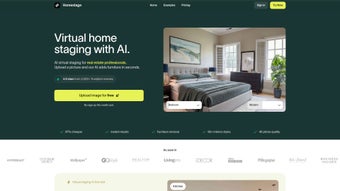

Download HomeStage – AI‑powered virtual furnishing tool for interior design and real‑estate
Overview
HomeStage is a cutting‑edge AI application that transforms ordinary room photos into fully furnished, photorealistic interiors in seconds. Designed for interior designers, real‑estate professionals, and DIY homeowners, the platform eliminates the time‑consuming manual placement of furniture by generating smart layouts from a single uploaded image. With a library of more than 250 curated furniture pieces, users can experiment with style, scale, and arrangement without leaving their browser.
HomeStage operates on a subscription model, positioning itself as a cost‑effective alternative to traditional design agencies while delivering high‑resolution visual outputs that boost marketing material, client presentations, and personal design projects. The tool runs entirely in the browser, requiring only JavaScript, and currently focuses on indoor spaces, making it perfect for living rooms, kitchens, bedrooms, and office areas. By delivering a rapid, secure, and intuitive visualization experience, HomeStage empowers creativity and accelerates decision‑making in the home‑improvement workflow.
Whether you need to stage a property for sale, create a client‑ready mock‑up, or simply explore new décor ideas, HomeStage provides a seamless bridge between imagination and realistic representation, all while keeping data privacy and performance at the forefront.
Key Features and How to Get Started
Feature Highlights
- AI‑driven room analysis that detects walls, windows, and floor dimensions.
- Instant generation of realistic furnishing layouts from a single photo.
- Library of 250+ high‑quality furniture models spanning modern, classic, and niche styles.
- One‑click style swapping to explore multiple décor themes.
- Export options for PNG, JPEG, and PDF for client presentations.
- Secure cloud processing—no software installation required on the user’s device.
- Subscription tiers with unlimited renders for professional users.
- Responsive web interface optimized for desktop, tablet, and mobile use.
- Real‑time drag‑and‑drop adjustments for precise placement.
- Automatic lighting and shadow adaptation to match the original photo.
Installation & Usage Instructions
HomeStage is a web‑based solution, so there is no traditional “install” step. To get started, follow these simple actions, each designed to keep the onboarding process under five minutes:
- Visit the official HomeStage website and click the “Start Free Trial” button.
- Create an account using an email address or social login (Google/Apple). The registration form collects only essential information to comply with GDPR.
- Confirm your email through the verification link and log into the dashboard.
- Upload a high‑resolution photo of the interior you wish to furnish. Ensure the image is well‑lit, taken from a straight angle, and captures the full room layout for optimal AI analysis.
- Select a furniture style from the sidebar, or let the AI suggest a default layout based on the room’s geometry.
- Review the generated scene. Use the intuitive drag‑and‑drop controls to fine‑tune placement, rotate items, or resize them for a perfect fit.
- When satisfied, click “Export” to download the scene as PNG, JPEG, or PDF, ready for client presentations or marketing material.
- Optional: Save the project to your account for future revisions or share a secure link with collaborators.
The entire workflow typically takes less than two minutes per room, allowing users to produce multiple design concepts in a single work session. Because all processing occurs in the cloud, your device’s hardware has little impact on performance, making HomeStage accessible even on modest laptops.
Compatibility, System Requirements, and Support
Operating System Compatibility
Because HomeStage runs in a modern browser, it is compatible with Windows 10/11, macOS 10.15+, Linux distributions with a Chromium‑based browser, as well as iOS 13+ and Android 9+ when accessed via Safari or Chrome. The only technical requirement is an active JavaScript engine, which is standard on all current browsers. No additional plugins, Flash, or Java installations are needed, ensuring a secure and frictionless experience across devices.
Performance Recommendations
While HomeStage is lightweight, a stable broadband connection (minimum 5 Mbps) guarantees swift upload and rendering times. For best results, use a screen resolution of at least 1280 × 720 px, and enable hardware acceleration in your browser settings. Users on slower connections may experience a slight delay during the AI analysis phase, but the system will automatically queue the job and notify you when the render is ready.
Customer Support and Resources
HomeStage offers a comprehensive knowledge base, video tutorials, and live chat support during business hours (UTC 0‑18). Premium subscribers receive priority email assistance and a dedicated account manager for large‑scale projects. Regular webinars introduce new furniture collections, advanced styling tips, and best practices for photo preparation, helping users stay up‑to‑date with the latest AI enhancements.
Pros, Cons & Frequently Asked Questions
Pros
- Speed: Generates furnished scenes in seconds, saving hours of manual drafting.
- Cost‑Effective: Subscription pricing is far cheaper than hiring a design agency.
- User‑Friendly: Intuitive drag‑and‑drop interface requires no prior design training.
- High‑Quality Visuals: Photorealistic rendering enhances marketing and client presentations.
- Extensive Furniture Library: Over 250 items cover a wide range of aesthetics.
- Secure Cloud Processing: All data is transmitted over HTTPS and deleted after 24 hours.
- Cross‑Platform Access: Works on Windows, macOS, Linux, iOS, and Android browsers.
Cons
- Limited to indoor spaces; outdoor or landscape visualizations are not supported.
- Requires a stable internet connection and JavaScript‑enabled browser.
- Subscription model may be less appealing for occasional hobby users.
- Advanced custom furniture imports are not currently available.
- AI may occasionally misinterpret complex room geometries, requiring manual adjustments.
Review Summary: HomeStage delivers a powerful, fast, and affordable solution for virtual furnishing, ideal for professionals who need high‑impact visuals without the overhead of traditional design software.
FAQ – Your HomeStage Questions Answered
Can I use HomeStage on a mobile phone?
Yes. HomeStage’s responsive web design works on iOS and Android browsers, allowing you to upload photos and generate furnished layouts directly from your smartphone or tablet.
Is there a free version or trial?
HomeStage offers a 7‑day free trial that includes up to 10 renders. After the trial, you can choose a monthly or annual subscription based on your rendering needs.
How secure is my uploaded photo?
All images are processed over HTTPS and are stored temporarily (maximum 24 hours) before being automatically deleted. HomeStage complies with GDPR and does not share your data with third parties.
Can I customize furniture dimensions?
While the AI places items at optimal scale, you can manually adjust size, rotation, and position using the on‑screen controls for finer control over the final layout.
What happens if my browser blocks JavaScript?
HomeStage relies on JavaScript for image analysis and rendering. If JavaScript is disabled, the tool will not function. Enabling JavaScript in your browser settings restores full capability.
Do I need a powerful computer to use HomeStage?
No. Because all heavy processing occurs in the cloud, any device that can run a modern browser will work. Even older laptops or tablets can upload photos and receive renders quickly.
Conclusion – Take the Next Step with HomeStage
HomeStage bridges the gap between creative vision and realistic presentation, offering a fast, secure, and affordable way to visualize furnished interiors. Whether you’re a real‑estate agent looking to stage a property, an interior designer needing rapid mock‑ups, or a homeowner planning a remodel, the AI‑driven platform gives you the power to experiment without the overhead of traditional software. By delivering photorealistic results in just a few clicks, HomeStage accelerates decision‑making and helps you close deals faster. Ready to transform your spaces? Download HomeStage now, start your free trial, and experience the future of virtual furnishing today.



.png)



